Key Takeaways
- Most “API is down” tickets on an Android SMS gateway are a dead phone, a spent SIM, or a key from the wrong environment.
- Separate HTTP accept from radio send from operator DLR. Debugging all three as one blob wastes the night.
- 401 is credentials. 429/allowance pause is plan policy (Free and Developer). Empty airtime is the carrier. They are not the same error.
- Idempotency on your side stops duplicate OTP when the client times out after the control plane accepted the job.
- Priced by devices and SMS send volume. You use your own phone and operator SMS credit. Retries spend both meters.
- Confirm live fields in Developer Center; this page is a failure-mode map, not an OpenAPI dump.
Searchers for android sms gateway api troubleshooting usually have a red deploy and a quiet phone. The HTTP client is the loudest component, so it gets blamed first. On a SIM gateway that is the wrong default. The API is a queue in front of a radio. Treat it that way and the night gets shorter.
Hub C companion to the Android SMS gateway API guide. Live parameters: SMS API documentation. Phone-centric cousin: Android phone as SMS gateway.
If the stock Messages app cannot send a text from that SIM, your JSON is not the patient.
Split the stack before you grep
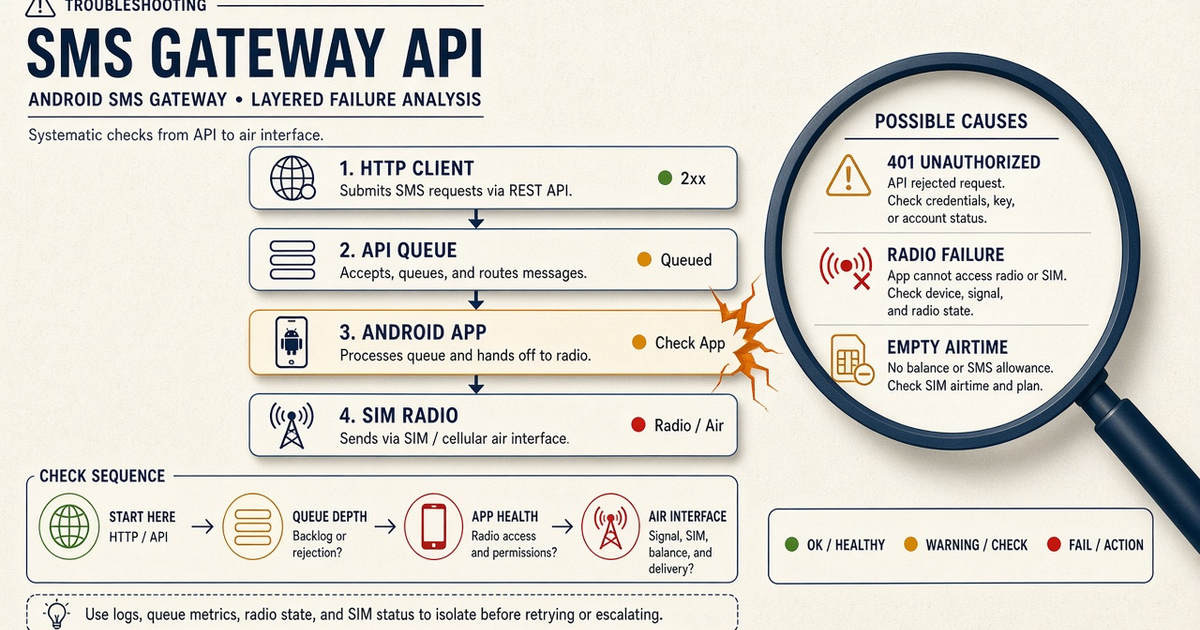
Four boxes, same as the architecture diagram on the phone cornerstone: your backend, the control plane, the Android app, the operator. Write the symptom on a sticky note and point at one box. If you cannot point, you do not have a hypothesis yet.
Priced by devices and SMS send volume. You use your own phone and operator SMS credit. Troubleshooting does not add a meter. It does spend airtime if you retry into a broken radio.
Symptom to layer matrix
| What you see | Likely layer | Fastest proof | Wrong rabbit hole |
|---|---|---|---|
| 401 / invalid token | Client auth | Call with a freshly copied server-side key | Reinstalling the APK |
| Plan / quota error; sends pause | Control plane allowance | Dashboard usage vs Free 300 lifetime or Developer yearly cap | Blaming the operator SIM |
| Accepted, device offline | Android app / OEM | Heartbeat, battery exemption, SMS permission | Rewriting JSON field names |
| Device online, stock SMS fails | SIM / operator | Manual send; check prepaid balance | Rotating API keys |
| Stock SMS works, API send does not | App pairing or deviceIds routing | Send from panel to the same number | Carrier “API outage” tweets |
| Sent, no DLR / user silent | Operator filter or quiet hours | Second operator canary; wording check | Adding more retries of the same body |
| User got two codes | Your client retry | Idempotency key / timeout vs accept | Buying a second phone immediately |
401 / 403: keys and environment
Keys are server-side. A frontend bundle, a CI log, or a support ticket is a leak. Staging keys against production base URLs produce confusing 401s. Rotate after a contractor. Do not paste keys into this blog, and do not ask the app to store your cloud secret — pairing is a device credential, not your REST token.
403 on a specific verb often means the key’s role cannot do that action. Compare with a panel send. If the panel works, the key is the diff.
Plan allowance vs operator credit
Two wallets. Platform send volume is the plan (Free lifetime 300; Developer 25,000 SMS per year; Starter / Professional / Business uncap platform volume while devices still meter). Operator airtime is the prepaid or postpaid SIM. Sends pause on Free and Developer when the platform allowance is exhausted — that is not silent $0.0x overage. An empty SIM looks like failed radio DLR, not like a plan pause.
Check device and SMS volume pricing when the error mentions quota. Check the carrier balance USSD or app when stock Messages also fails.
HTTP 200, nothing on the phone
Accepted means queued. Open the device in the panel. If last-seen is hours ago, fix OEM battery, Wi-Fi, and SMS permission before touching code. Reboot once. Send a panel canary. If panel works and API does not, log the request id and compare `deviceIds` — you may be routing to a phone in a drawer.
Multi-device accounts: omitting `deviceIds` uses the primary. A stale primary is a classic “API randomly fails” report. See multi-device and dual SIM.
Sent, not delivered
The modem fired. Now you are in operator land: filters, destination ported numbers, roaming, or a recipient with a full inbox. Use DLR and a second destination on another carrier. If wording looks like a blast, read the spammy wording how-to instead of opening extra API tickets.
Concatenated UCS-2 messages fail more often on cheap destinations. Measure segments. Keep OTP on GSM-7.
Client timeouts and duplicate OTP
Your HTTP client waits 3 seconds. The control plane accepted at second 3.1. You retry. The user gets two codes. Fix: idempotency key from your app, longer timeout on send, and OTP reuse window in yourauth service. The gateway should not be the only place that knows those two jobs were one login.
Status codes worth memorizing as a class, not as a frozen list: HTTP response status codes — 4xx is you, 5xx is retry with backoff, 429 is slow down. Map gateway-specific bodies in live docs.
Payload and encoding traps
Wrong `to` format (missing country code, local trunk prefix) is the weekday classic. Encode E.164 in your app; do not hope the radio guesses. Empty `text`, a file URL the phone cannot fetch for MMS, or a device id that is not in the account all accept-or-reject at different layers — read the error, do not retry the same bytes.
PHP and C# HTTPS samples live on PHP samples and C# samples. They are language samples, not a packaged multi-language SDK.
Webhooks silent
Sends work, callbacks do not: TLS, wrong URL, signature mismatch, or a firewall that allows your laptop but not the control plane. See the webhook in-depth guide. Poll GET-by-id as a fallback, not as your only production design.
On-call checklist
- Stock Messages send from the production SIM.
- Panel shows the device online; last-seen minutes, not hours.
- Correct environment key; no key in the client bundle.
- Allowance vs SIM balance distinguished.
- Canary to staff numbers; OTP pool isolated from marketing.
- Request id saved; one change at a time.
- Spare charged device paired before you promise failover.
- Live error fields checked in Developer Center.
Next steps
Print the matrix next to the rack (or the filing cabinet) that holds the phones. Walk setup, keep the app alive with the app guide, and only then optimize the client. Most API mysteries end with a charger.
Related product pages
Jump to the live product docs for this topic—not another long-form article.
- SMS API documentationLive endpoint reference
- device and SMS volume pricingPlans and allowances
- Android SMS gateway product guideDefinition, product, and how to buy
- download the Android gateway appGet the APK